M365 のセキュリティ対策、説明できますか?
Microsoft 365 には数百のセキュリティ設定があります。問題は「設定が正しいか」ではなく、「なぜその設定が必要で、何を優先し、改善したことをどう説明するか」です。
このツールは、47 のベストプラクティスルールで構成を評価し、改善活動の計画・実行・説明を支援します。診断するだけのツールではありません。
PDCA サイクルで改善活動を回す
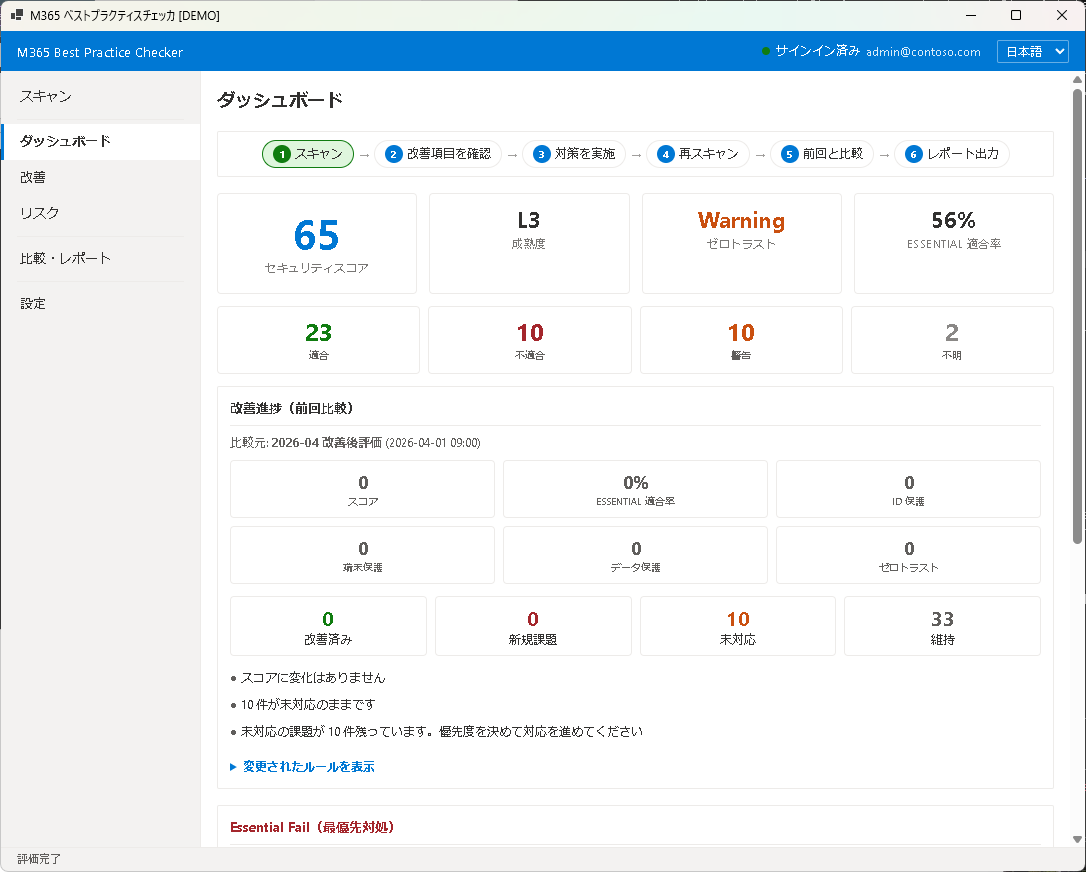
1 スキャン
→
2 改善項目を確認
→
3 対策を実施
→
4 再スキャン
→
5 前回と比較
→
6 レポート出力
3 つの価値
1. 現状を診断する — 47 ルールでスコアリング。Essential / Recommended / Advanced の 3 段階で優先度を判定。
2. 改善計画を立てる — リスク・効果・難易度に基づく対策カード。変更影響・問い合わせ想定・利用者案内まで提示。
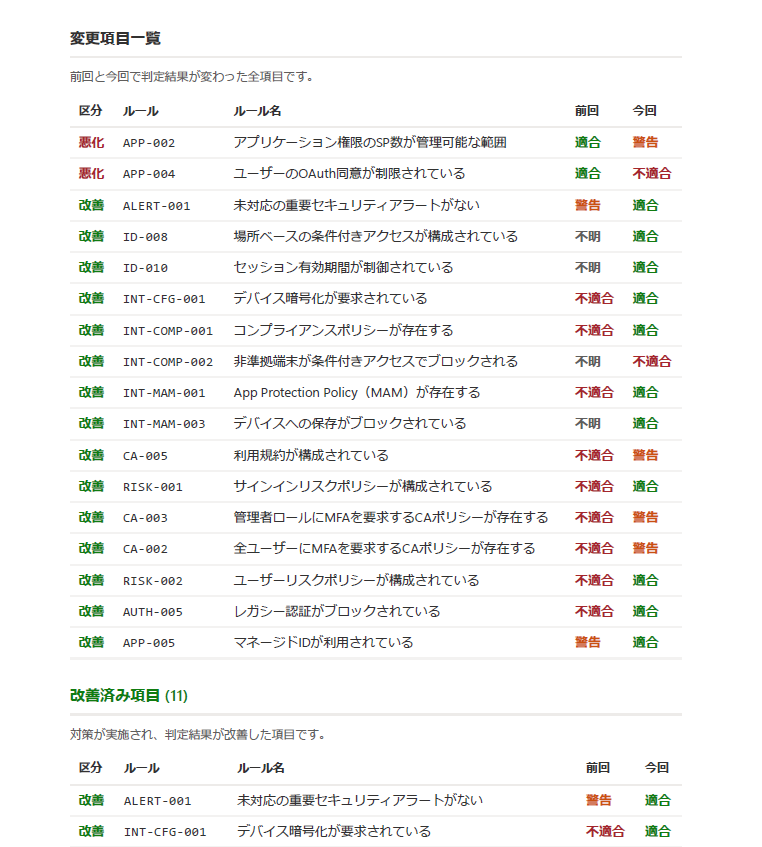
3. 改善成果を報告する — 前回との比較で改善済み・新規課題・継続課題を分類。管理職・監査向けの PDF レポートを生成。
主な機能
セキュリティスコア
100 点満点のスコアと 5 段階の成熟度。Essential 適合率とレイヤースコア(ID / 端末 / データ / ZT)で全体像を把握。
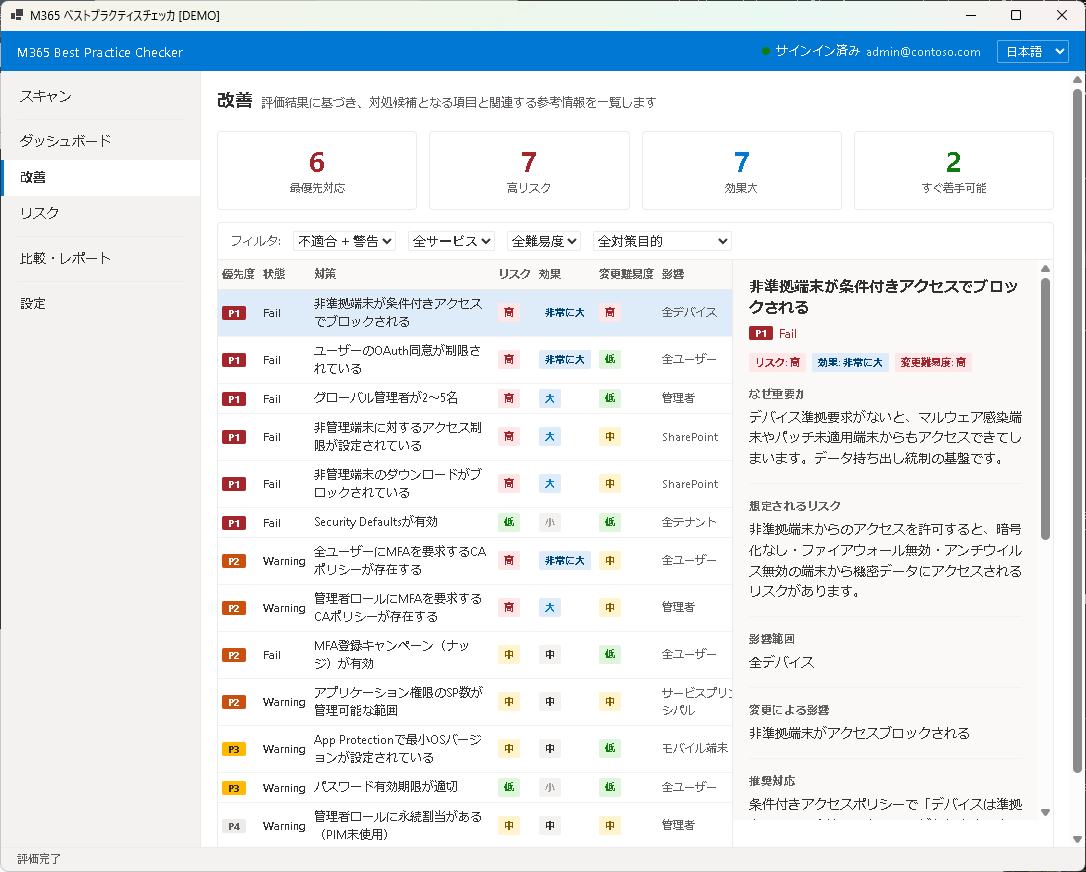
改善対策カード
各ルールに「なぜ重要か」「リスク」「推奨対応」「変更影響」「利用者案内」を用意。意思決定に必要な情報をすべて提示。
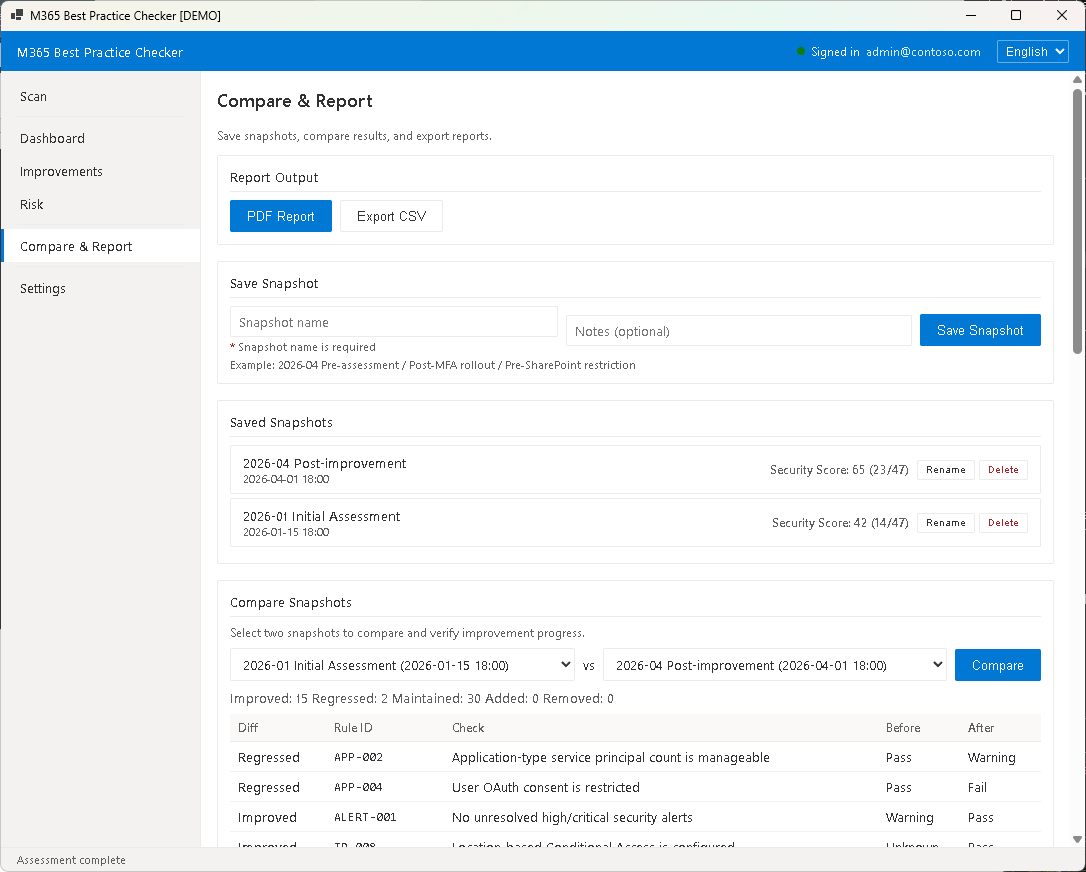
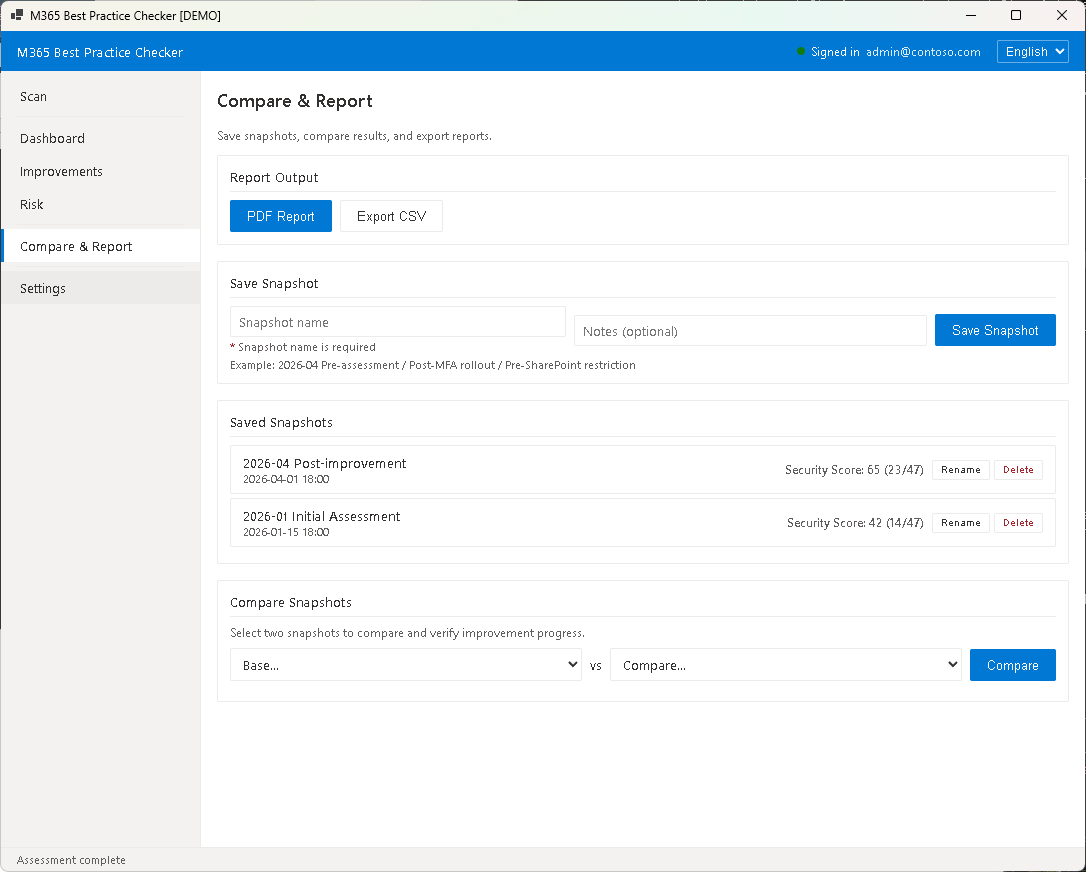
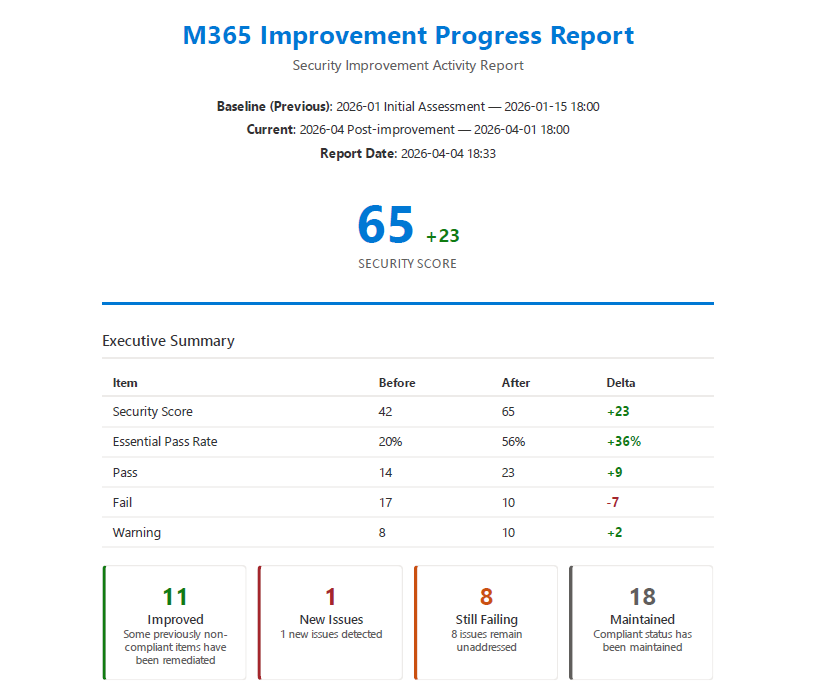
改善進捗レポート PRO
スナップショット保存 → 再スキャン → 比較。改善済み / 新規課題 / 継続課題を自動分類し、成果報告用 PDF を生成。
変更影響データ
全 41 ルールに「いつ影響が出るか」「どんな問い合わせが来るか」「利用者への案内文」を記載。ヘルプデスク対応にも使える。
改善画面
比較レポート
Free / Pro エディション比較
| 機能 | Free | Pro |
|---|
| セキュリティ評価の実行 | ✓ | ✓ |
| スコア・成熟度の表示 | ✓ | ✓ |
| 改善一覧・フィルタ | ✓ | ✓ |
| PDF レポート出力 | — | ✓ |
| CSV エクスポート | — | ✓ |
| スナップショット保存 | — | ✓ |
| 前回との比較 | — | ✓ |
| 比較レポート PDF | — | ✓ |
| ルール詳細テキスト | — | ✓ |
| 変更影響の詳細 | — | ✓ |
| 改善ステータス管理 | — | ✓ |
Free 版でも全 47 ルールの評価を実行できます。Pro はレポート・比較・詳細データが利用できます。
プライバシー: 本ツールはローカルで動作します。評価データはお使いの PC にのみ保存され、外部サーバーには送信されません。Microsoft Graph API との通信はテナント情報の読み取りのみで、設定の変更は行いません。
動作環境
| OS | Windows 10 / 11 |
| ランタイム | .NET 8 Desktop Runtime |
| 必須コンポーネント | Microsoft Edge WebView2 Runtime |
| ネットワーク | Microsoft Graph API へのアクセス(スキャン時のみ) |
必要な Graph API 委任権限
以下の委任権限(Delegated permissions)が必要です。管理者の同意が必要です。
| User.Read | サインイン・ユーザープロフィール(既定権限) |
| Policy.Read.All | セキュリティポリシー・CA ポリシー・認証方法 |
| User.Read.All | ユーザー一覧・アカウント状態 |
| RoleManagement.Read.Directory | 管理者ロール割当 |
| Application.Read.All | アプリ登録・サービスプリンシパル |
| Agreement.Read.All | 利用規約 |
| DeviceManagementConfiguration.Read.All | Intune コンプライアンスポリシー・デバイス構成 |
| DeviceManagementApps.Read.All | Intune App Protection Policy(MAM) |
| SharePointTenantSettings.Read.All | SharePoint 外部共有設定 |
| SecurityAlert.Read.All | セキュリティアラート |
| Domain.Read.All | ドメイン情報 |
すべて読み取り専用です。テナントの設定を変更する権限は含まれていません。
Can you explain your M365 security posture?
Microsoft 365 has hundreds of security settings. The challenge isn't whether settings are correct — it's explaining why they matter, what to prioritize, and how to demonstrate improvement.
This tool evaluates your configuration against 47 best practice rules and supports planning, executing, and explaining security improvements. Not just a diagnostic tool.
Drive improvement with the PDCA cycle
1 Scan
→
2 Review
→
3 Fix
→
4 Re-scan
→
5 Compare
→
6 Report
Three core values
1. Diagnose — Score your configuration against 47 rules. Three priority levels: Essential / Recommended / Advanced.
2. Plan — Action cards with risk, effect, difficulty, change impact, expected inquiries, and user guidance.
3. Report — Compare with previous results. Auto-classify improved / new issues / ongoing issues. Generate PDF reports for management and audit.
Key features
Security Score
100-point score with 5 maturity levels. Essential pass rate and layer scores (Identity / Device / Data / Zero Trust).
Action Cards
Each rule includes "Why it matters", risk explanation, remediation steps, change impact, and user guidance.
Comparison Reports PRO
Save snapshots, re-scan, compare. Auto-classify improved / new issues / ongoing. Generate PDF reports.
Change Impact Data
All 41 rules include "when impact occurs", "expected inquiries", and "user guidance" — ready for helpdesk use.
Improvement screen
Comparison report
Free / Pro Edition Comparison
| Feature | Free | Pro |
|---|
| Run security assessment | ✓ | ✓ |
| Score & maturity display | ✓ | ✓ |
| Improvement list & filters | ✓ | ✓ |
| PDF report export | — | ✓ |
| CSV export | — | ✓ |
| Snapshot save | — | ✓ |
| Compare with previous | — | ✓ |
| Comparison PDF report | — | ✓ |
| Full rule detail text | — | ✓ |
| Change impact details | — | ✓ |
| Improvement status management | — | ✓ |
Free edition evaluates all 47 rules. Pro unlocks reports, comparison, and detailed data.
Privacy: This tool runs locally. Assessment data is stored only on your PC and is never sent to external servers. Communication with Microsoft Graph API is read-only — no configuration changes are made.
System requirements
| OS | Windows 10 / 11 |
| Runtime | .NET 8 Desktop Runtime |
| Required | Microsoft Edge WebView2 Runtime |
| Network | Microsoft Graph API access (scan only) |
Required Graph API Delegated Permissions
The following delegated permissions are required. Admin consent is needed.
| User.Read | Sign-in, user profile (default permission) |
| Policy.Read.All | Security policies, CA policies, auth methods |
| User.Read.All | User list, account status |
| RoleManagement.Read.Directory | Admin role assignments |
| Application.Read.All | App registrations, service principals |
| Agreement.Read.All | Terms of Use |
| DeviceManagementConfiguration.Read.All | Intune compliance policies, device config |
| DeviceManagementApps.Read.All | Intune App Protection Policy (MAM) |
| SharePointTenantSettings.Read.All | SharePoint external sharing settings |
| SecurityAlert.Read.All | Security alerts |
| Domain.Read.All | Domain information |
All permissions are read-only. No permissions to modify tenant settings are included.