ダッシュボード
ダッシュボードは、スキャン結果の全体像を一目で把握するための画面です。PDCA サイクルに沿ってテナントのセキュリティ改善を進められるよう設計されています。
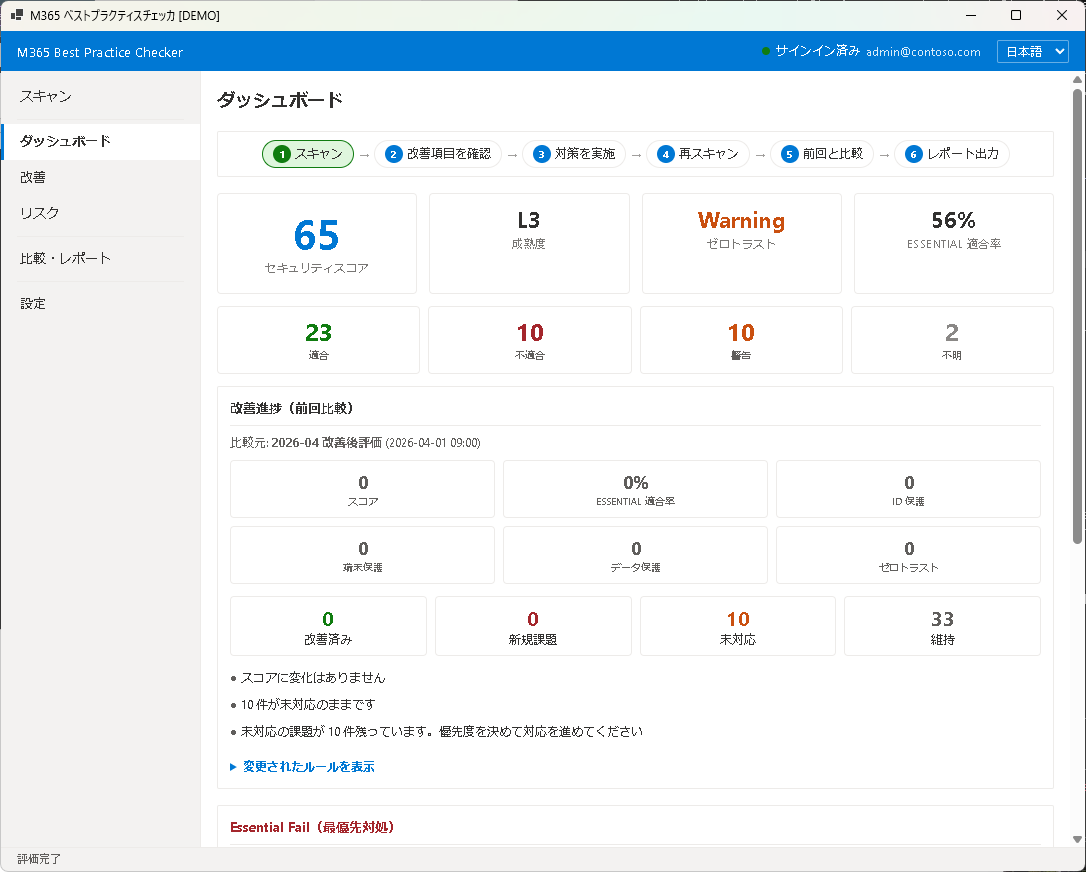
PDCA フロー
ダッシュボード上部には、現在の改善サイクルの位置が表示されます:
- Plan — スキャン結果を確認し、改善対象を特定する
- Do — Improvements 画面で対策を実施する
- Check — 再スキャンして改善効果を確認する
- Act — 比較レポートで改善の推移を記録する
スコア表示
中央に大きく表示される総合スコアは、全ルールの評価結果を重み付きで集計した 100 点満点のスコアです。スコアの横にはレベル(L1〜L5)が表示され、テナントのセキュリティ成熟度を示します。
件数サマリー
スコアの下には、Pass / Fail / Unknown の件数がカードで表示されます:
- Pass(緑) — ベストプラクティスに準拠している項目
- Fail(赤) — ベストプラクティスに準拠していない項目
- Unknown(グレー) — 権限不足や該当なしで評価できなかった項目
前回比較
以前のスキャン結果(スナップショット)がある場合、スコアの変動と Pass/Fail 件数の増減が表示されます。これにより、設定変更の効果を定量的に確認できます。
Essential Fail
「Essential Fail」セクションには、特に重要度が高く最優先で対処すべき Fail 項目が一覧表示されます。これらは、セキュリティ上のリスクが大きいか、他の改善の前提となる項目です。
次のステップ
Fail 項目の詳細と具体的な対処方法は Chapter 4: 改善で確認できます。
Dashboard
The Dashboard provides an at-a-glance overview of your scan results. It is designed around the PDCA cycle to guide continuous security improvement of your tenant.
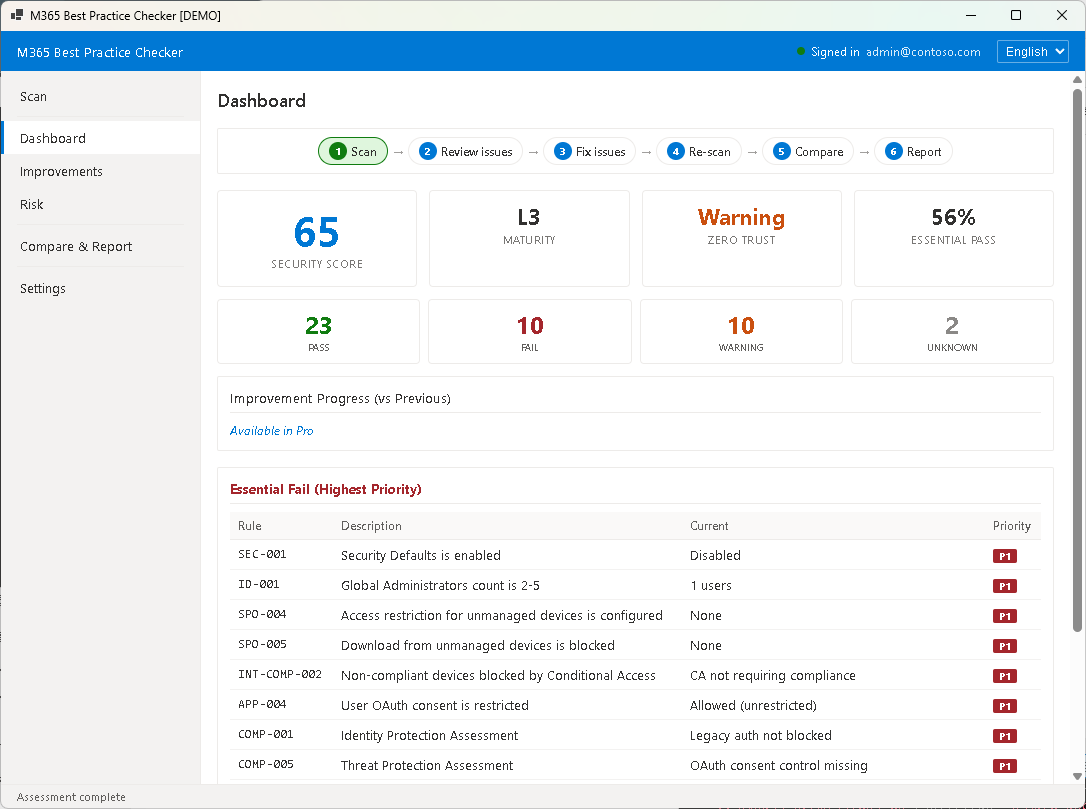
PDCA Flow
The top of the Dashboard shows your current position in the improvement cycle:
- Plan — Review scan results and identify areas for improvement
- Do — Implement remediation actions in the Improvements screen
- Check — Re-scan to verify improvements
- Act — Record progress through comparison reports
Score Display
The overall score displayed prominently in the center is a weighted aggregate of all rule evaluations on a 100-point scale. Next to the score, a level indicator (L1–L5) shows your tenant's security maturity.
Count Summary
Below the score, Pass / Fail / Unknown counts are shown as summary cards:
- Pass (green) — Items that comply with best practices
- Fail (red) — Items that do not comply with best practices
- Unknown (gray) — Items that could not be evaluated due to insufficient permissions or missing settings
Previous Comparison
When previous scan results (snapshots) are available, score changes and Pass/Fail count differences are displayed. This allows you to quantitatively verify the effect of configuration changes.
Essential Fail
The "Essential Fail" section lists the highest-priority Fail items that should be addressed first. These represent either significant security risks or prerequisite items for other improvements.
Next Step
See Chapter 4: Improvements for detailed remediation guidance on each Fail item.